



Free Funnel Audit
Convert more customers today!
SEO
10 mins read

SEO
10 mins read
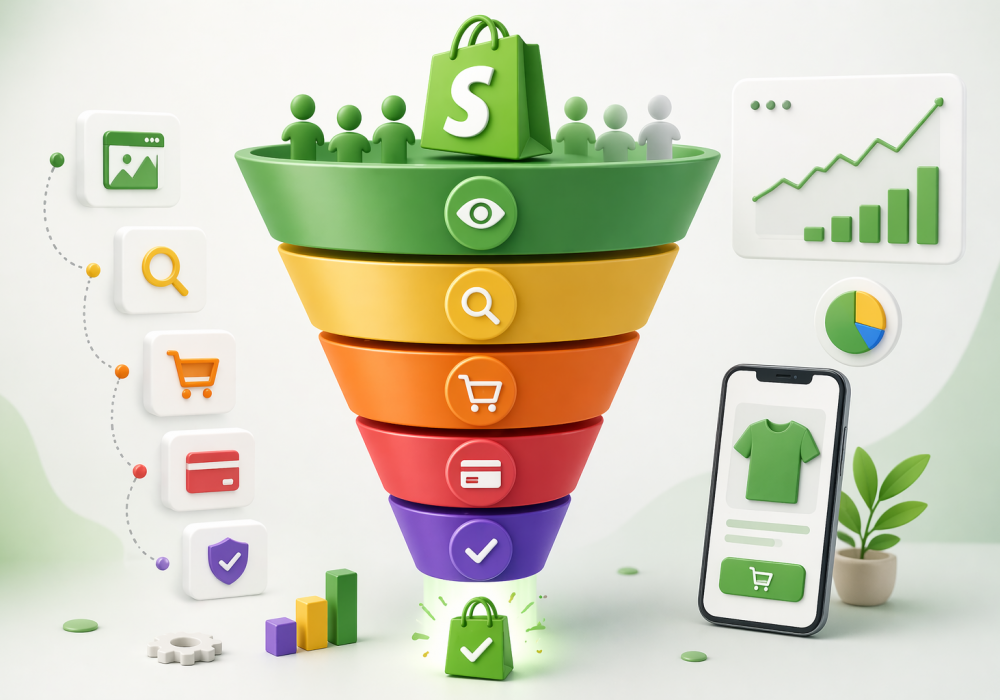
Your Shopify store doesn’t need more traffic. It needs to convert the traffic it already has into buyers.
That’s the truth most store owners learn the hard way. Ads bring people in. But something inside your store quietly pushes them away. That’s where conversion rate optimization steps in.
Traffic feels exciting. You see visitors coming in and numbers go up. But sales? Not so much.
That gap is where most stores struggle.
People land on your store, look around, and leave. Not because they hate your product. But because something doesn’t feel right.
It could be:
Even small friction can kill a sale.
You might notice:
It’s like people walking into a shop, picking up items, and then quietly walking out.
A “good” store doesn’t need huge traffic.
If your store sits below 1%, something is broken. Not badly built. Just not optimized.
Conversion rate optimization means improving your store so more visitors take action.
That action could be:
CRO = making it easier for people to say “yes”
That’s it.
More traffic without CRO is like pouring water into a leaky bucket. You don’t need more visitors. You need more buyers.
Start by improving conversions. Once that’s working, increase your traffic.
A “good” conversion rate depends on your industry, traffic source, and audience. But there are clear benchmarks that help you understand where you stand.
Across most Shopify stores, the average conversion rate sits between 2% and 3%.
This aligns with industry data from platforms like IRP Commerce and Shopify’s own reports.
So if your store is below 2%, there’s likely room to improve. And if you’re above 3%, you’re already doing better than many competitors.
Different industries behave differently. Price, urgency, and product type all play a role.
| Industry | Average Conversion Rate |
| Fashion | 1.5% – 2.5% |
| Beauty | 2% – 3% |
| Electronics | 1% – 2% |
| Home & Decor | 1.8% – 3% |
For example, electronics often convert lower because people take longer to decide. On the other hand, beauty products can convert faster due to repeat buying behavior.
Different types of source behave differently.
| Traffic Source | Typical Conversion Rate |
| 5% – 7% | |
| Paid Search | 2% – 4% |
| Organic Search | 2% – 3% |
| Social Media | ~1% |
Why this happens
So if most of your traffic comes from social media, a lower conversion rate is normal. Context matters.
Mobile traffic dominates in 2026. But it still converts less than desktop.
This gap exists for a few simple reasons:
That’s why mobile optimization is no longer optional. It directly affects revenue.
Returning visitors are far more likely to buy. In most cases, they convert 2 to 3 times higher than new visitors.
Here’s why:
This is also why email marketing and retargeting work so well. They bring people back when they’re ready to buy.
Simple formula:
Conversion Rate = (Orders ÷ Visitors) × 100
Conversion rate = (200 ÷ 10,000) × 100 = 2%
Keep it clean. Keep it consistent.
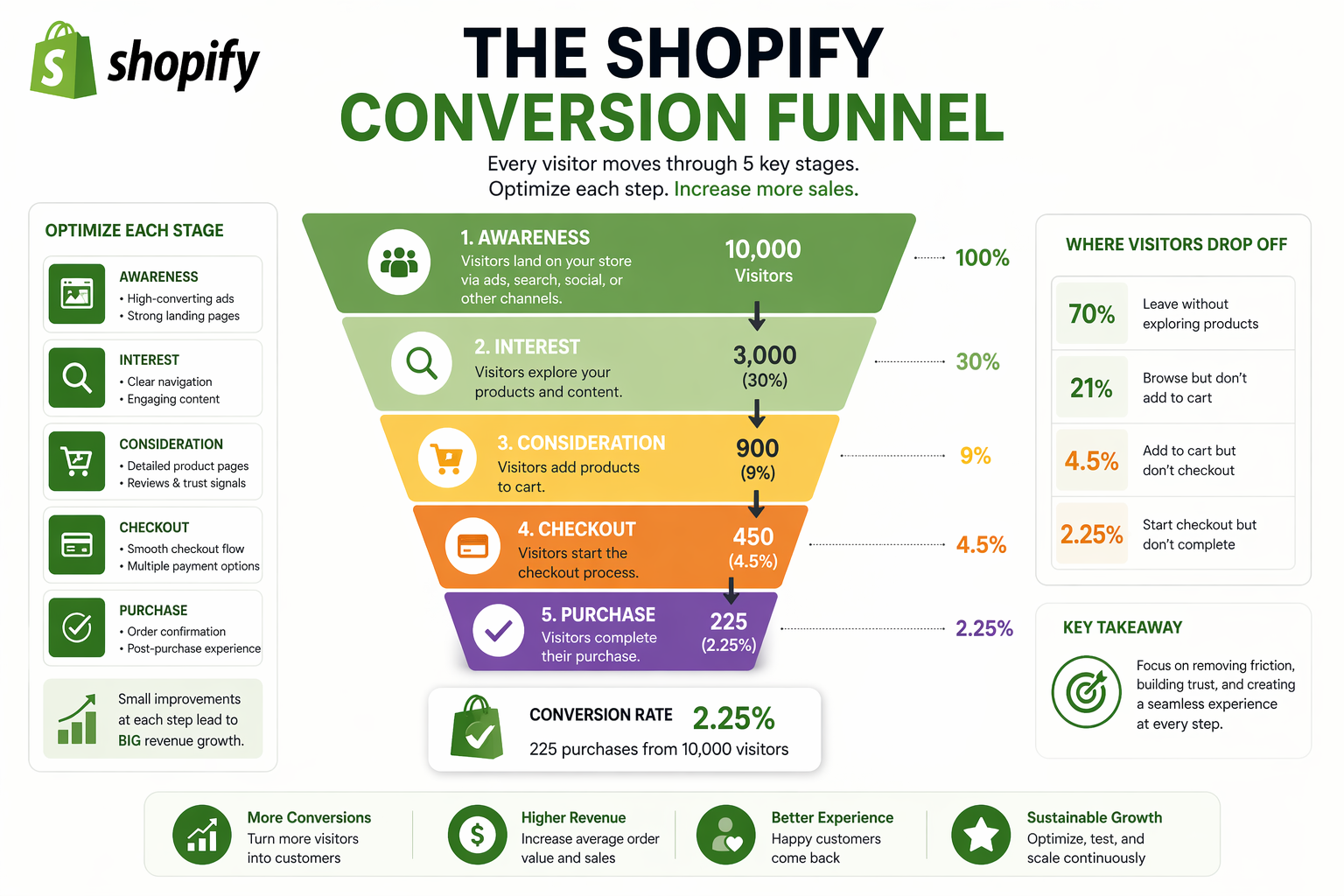
Every store follows the same journey.
Awareness → Product → Cart → Checkout
Think of it like a funnel. Wide at the top. Narrow at the bottom.
Simple funnel:
Visitors
↓
Product Views
↓
Add to Cart
↓
Checkout
↓
Purchase
Each step leaks users. Your job is to plug those leaks.
This is where most stores skip the work. That’s why they struggle. Let’s fix that.
If people leave instantly, your first impression fails.
Fix:
Look at:
If users don’t scroll, they don’t care.
Fix:
Low add-to-cart means weak desire.
Fix:
Cart abandonment is normal. But too high is a problem.
Fix:
Let’s break down the real reasons, along with how to spot and fix them.
Speed is often the first silent killer.
If a page takes more than a few seconds to load, people leave before they even see your product. It’s not personal. It’s just how people behave online.
What to check
What bad looks like
What to fix
A product page should answer questions before the customer asks them. If it doesn’t, doubt creeps in.
Sometimes the page looks pretty but feels empty. Or it’s full of text but still unclear.
What to check
What bad looks like
What to fix
Trust is everything in online shopping. Without it, even a great product won’t sell.
Think about it. Would you buy from a store with no reviews and no proof?
What to check
What bad looks like
What to fix
Checkout should feel effortless. If it feels like work, people drop off.
Every extra step creates friction and friction kills momentum.
What to check
What bad looks like
What to fix
This one frustrates buyers the most.
A product looks affordable at first. Then shipping, taxes, or extra fees appear at the last step. That breaks trust instantly.
What to check
What bad looks like
What to fix
Most traffic comes from mobile. But many stores still feel built for desktop view.
If users struggle to tap, scroll, or read, they won’t stay.
What to check
What bad looks like
What to fix
If users can’t find what they want, they won’t keep searching.
Simple navigation often beats clever design.
What to check
What bad looks like
What to fix
More options don’t always help. In fact, they often overwhelm.
When users see too many similar products, they delay the decision. Or worse, they leave.
What to check
What bad looks like
What to fix
Payment is the final step. If it fails, everything else becomes useless.
Even small glitches can break trust instantly.
What to check
What bad looks like
What to fix
People don’t just buy products. They buy confidence.
If they don’t know what happens after purchase, they hesitate.
What to check
What bad looks like
What to fix
A store without contact details feels risky.
Buyers want to know there’s a real business behind the screen.
What to check
What bad looks like
What to fix
Not all visitors are potential buyers.
You can have thousands of visitors and still get zero sales if the audience is wrong.
What to check
What bad looks like
What to fix
If users don’t understand why your product matters, they won’t buy it.
This often happens when messaging is vague or generic.
What to check
What bad looks like
What to fix
Sometimes users like the product. They just don’t feel the need to buy now.
Without a reason to act, they delay. And often never return.
What to check
What bad looks like
What to fix
Search is often overlooked. But users who search are usually ready to buy.
If search fails, you lose high-intent buyers.
What to check
What bad looks like
What to fix
Most stores fail because of small gaps across the experience. Fix those gaps one by one, and conversions start to climb.
Your product page is where decisions happen. If this page feels weak, everything else falls apart.
People can’t touch your product. So visuals do the heavy lifting.
What to do
Why it works
Buyers want to imagine owning the product. A flat image doesn’t help much. But when they see someone using it, things click. It feels real. And that reduces hesitation.
How to implement in Shopify
Go to your product page inside Shopify admin. Upload multiple images and arrange them in a logical order. Start with a clean hero image. Then show usage shots, close-ups, and details.
For videos, you can embed directly or use apps that support media galleries.
Helpful tools
Tool | What it does |
Shopify Native Media | Add images, 3D, videos easily |
Loox Reviews App Shopify | Collect photo reviews |
GemPages | Create rich product layouts |
Most product descriptions try too hard. Big words. Long paragraphs. But users just want clarity.
What to do
Why it works
People don’t read every word. They scan. If your content is easy to skim, they stay longer. And when doubts are answered early, they feel more confident buying.
How to implement in Shopify
Edit product descriptions inside Shopify. Use formatting like:
Think like a customer. What would you ask before buying?
Helpful tools
Tool | What it does |
Copy.ai | Helps draft product copy |
Grammarly | Keeps language clear and simple |
This is where most stores get vague. They describe the product. But they don’t make a strong case for buying it.
What to do
Answer three things clearly:
Place this near the top of the page.
Why it works
People decide fast. If your value is not clear in a few seconds, they leave. A strong message reduces confusion and builds urgency.
How to implement in Shopify
Add a short headline above the product title or near the price. Follow it with 2–3 bullet points that explain key benefits.
Example:
Helpful tools
Tool | What it does |
Shogun Page Builder | Customize layouts easily |
People trust other buyers more than brands. So your job is to show proof.
What to do
Why it works
Reviews remove doubt. When someone sees others happy with the product, it feels safer to buy.
How to implement in Shopify
Install a review app. Sync it with your product pages. Make sure reviews appear above the fold or close to the CTA.
Helpful tools
Tool | What it does |
Judge.me | Collect and display reviews |
Yotpo | Advanced review system |
Photos from real customers work better than brand photos.
What to do
Why it works
Real usage feels authentic. It answers the silent question: “Will this work for me?”
How to implement in Shopify
Collect customer photos via email or post-purchase flow. Display them on product pages or homepage.
Helpful tools
Tool | What it does |
Loox Reviews App Shopify | Collect photo reviews |
Foursixty | Turn social posts into shoppable content |
Small icons can make a big difference.
What to do
Why it works
People worry about scams. These signals reduce fear and make checkout feel safe.
How to implement in Shopify
Add badges near the “Add to Cart” button or checkout section using theme settings or apps.
Helpful tools
Tool | What it does |
Ultimate Trust Badges | Add trust icons easily |
This is the final step. And also the most sensitive one.
What to do
Allow users to checkout without creating an account.
Why it works
Forced sign-ups create friction. Many users leave instead of filling forms.
How to implement in Shopify
Go to Settings → Checkout. Enable guest checkout option.
What to do
Why it works
Every extra step increases drop-off. A shorter path leads to more completed purchases.
How to implement in Shopify
Use Shopify’s one-page checkout or simplify your existing flow. Remove optional fields.
What to do
Offer:
Why it works
Different users prefer different payment methods. More options mean fewer lost sales.
How to implement in Shopify
Enable payment providers in Shopify settings.
Helpful tools
Tool | What it does |
Shopify Payments | Accept cards and wallets |
Klarna | Offer pay-later options |
Most users are on mobile. Yet many stores still feel desktop-first.
What to do
Why it works
Speed affects patience. Slow pages lose users before they even see your product.
How to implement in Shopify
Use lightweight themes. Audit apps and remove unused ones.
Helpful tools
Tool | What it does |
Google PageSpeed Insights | Analyze speed issues |
What to do
Why it works
Mobile users scroll with thumbs. If tapping feels hard, they stop trying.
How to implement in Shopify
Test your store on your own phone. Try buying your product. Notice friction.
What to do
Why it works
Confused users don’t convert. Clear paths keep them moving forward.
How to implement in Shopify
Edit navigation menus in admin. Keep it minimal.
These are small nudges that push users to act now instead of later.
What to do
Why it works
Scarcity creates action. People don’t want to miss out.
How to implement in Shopify
Use apps that display stock levels or timers on product pages.
Helpful tools
Tool | What it does |
Hurrify | Adds urgency timers |
What to do
Why it works
A small incentive can remove hesitation. It gives users a reason to act now.
How to implement in Shopify
Create discount codes inside Shopify. Display them clearly on site.
What to do
Show a popup when users try to leave.
Offer:
Why it works
It’s your last chance to convert. Many users reconsider when given a small incentive.
How to implement in Shopify
Install a popup app and trigger it on exit intent.
Helpful tools
Tool | What it does |
OptiMonk | Exit-intent popups |
Privy | Capture leads |
No coding needed. Just simple fixes.
These small changes often create fast results.
Now things get interesting.
Show products based on user behavior. People like stores that “get them.”
Smart suggestions increase order value. Think: “You may also like…”
Fix your search bar. Bad search = lost sales.
Different users see different pages. More relevance = more conversions.
The sale doesn’t end at checkout. Upsell after purchase. Easy revenue.
At its core, CRO testing is simple. You try one change, compare results, and keep what works. The goal is not perfection. The goal is learning what your customers respond to.
A/B testing means showing two versions of the same page to different users.
Half your visitors see A. The other half see B. Then you compare which version gets more conversions.
That’s it. No guessing, just real data.
Shopify doesn’t have built-in A/B testing for most themes. So you’ll need a tool. Thankfully, setup is still simple.
Option 1: Use a Shopify app
Install a testing app and connect it to your store.
Popular options include:
Basic setup steps
Option 2: Manual testing (simpler but slower)
If you don’t want a tool, you can still test changes.
This method is less precise. But it works when starting out.
Not all tests are equal. Some changes move the needle more than others. Start with these:
Your headline is the first thing users read.
Test ideas
Images shape perception instantly.
Test ideas
Small changes here can have a big effect.
Test ideas
Price presentation matters more than people think.
Test ideas
Trust often decides the sale.
Test ideas
Short answer. Longer than you think.
Most tests should run at least 1–2 weeks. But time alone is not enough. What matters more is data.
You need enough visitors before calling a winner.
Here’s a simple way to think about it:
If your store gets low traffic, tests will take longer. That’s normal.
This sounds complex, but it’s not.
Statistical significance means your result is likely real, not random.
For example:
That result is unreliable.
Now imagine:
That result is much more trustworthy.
Most tools will show a “confidence level.” Aim for 90% or higher before deciding a winner.
Even simple tests can go wrong. Watch out for these.
If all of this still feels like a lot, use this flow:
These are the tools that help you get results.
Before fixing anything, you need to see what’s happening inside your store. These tools help you track traffic, behavior, and conversions.
Tool | What it does |
Google Analytics 4 | Tracks user journeys, traffic sources, and conversion events |
Shopify Analytics | Shows store performance, sales, and funnel data inside Shopify |
Why this matters
You can’t fix what you don’t understand. Analytics tools show where users drop off and which pages underperform.
Numbers tell you what is happening. Heatmaps show you how it’s happening. They reveal where users click, scroll, and stop.
Tool | What it does |
Hotjar | Shows heatmaps, session recordings, and user feedback |
Microsoft Clarity | Tracks clicks, scrolls, and user sessions at no cost |
Why this matters
You might think users see your CTA. Heatmaps often prove otherwise. Sometimes people never scroll far enough. That insight changes everything.
Instead of guessing, you test.
These tools help you compare two versions of a page and pick the winner.
Tool | What it does |
Optimizely | Runs controlled experiments on pages and features |
VWO | A/B testing with insights and behavior tracking |
CausalFunnel A/B Test Platform | Uses AI to test variations and improve conversion rates |
Why this matters
Small changes can lead to big results. But only testing tells you what actually works for your audience.
Not every visitor is the same. Personalization tools help you adapt your store based on user behavior.
Tool | What it does |
Dynamic Yield | Shows tailored content and product recommendations |
Nosto | Personalizes product suggestions and shopping experience |
Why this matters
A first-time visitor and a returning customer should not see the same experience. Personalization helps bridge that gap.
Most CRO advice sounds good on paper. But the real question is:
How do you actually apply this without guessing?
This is where platforms like CausalFunnel come in. Instead of relying on manual testing and assumptions, it uses real visitor data and AI to improve conversions automatically.
Let’s break this down in a practical way.
At its core, the tool helps you:
It does all of this without needing heavy manual setup.
Most store owners guess where the problem is. CausalFunnel doesn’t guess.
It tracks:
Then it highlights the exact points where conversions drop.
For example:
This is powered by heatmaps and behavior tracking combined.
Some visitors are new. Some are ready to buy. The tool groups users based on behavior like:
Each group then sees a slightly different experience. This matters because a first-time visitor needs trust. A returning visitor might just need a small push.
Most stores run random tests. Change the button color and hope it works.
CausalFunnel does this differently.
The platform is built to test real hypotheses, not random ideas.
Instead of showing the same page to everyone, the tool adapts content in real time.
Examples:
All of this happens automatically based on behavior signals like time spent or exit intent.
One big problem in CRO is incomplete data. You might see clicks. But not actual revenue impact.
The tool solves this by:
This gives a clearer picture of what’s actually working.
Instead of running one test and stopping, the platform keeps learning.
It uses:
So your store keeps improving over time, not just once.
Mobile traffic is huge. But conversions lag.
Not everything matters equally.
Think of revenue first.
Here are the real trends shaping Shopify CRO in 2026.
Personalization is no longer a “nice to have.” It’s becoming the default.
Instead of showing the same store to everyone, Shopify stores now adapt based on behavior.
What’s changing
Why it matters
People expect relevance. When a store feels tailored, it builds trust faster and reduces decision time.
Think about it. If someone lands on your store after viewing sneakers, showing them random products makes no sense. Showing similar styles does.
How this impacts CRO
Writing product descriptions used to take hours. Now AI tools can generate them in seconds.
But speed is not the real advantage. Testing is.
What’s changing
Why it matters
Different customers respond to different messaging. Some want detailed specs. Others want quick benefits.
AI makes it easier to test and refine this without starting from scratch each time.
How this impacts CRO
Headless commerce is becoming more common, especially for growing brands. In simple terms, it means separating the front-end (what users see) from the back-end (Shopify).
What’s changing
Why it matters
Traditional themes can slow down innovation. Headless setups allow faster experiments and unique user experiences.
For example, brands can create lightning-fast landing pages or highly interactive product pages.
How this impacts CRO
Checkout is getting shorter every year. Shopify has pushed this heavily with Shop Pay, which allows users to complete purchases in one click after saving their details.
What’s changing
Why it matters
Every extra step increases drop-off. One-click checkout removes friction completely.
Shop Pay has been shown to convert better than standard checkout flows because it saves time and reduces effort.
How this impacts CRO
Shopping is starting to feel like scrolling through content.
Instead of hard selling, brands are using stories, videos, and education to drive purchases.
What’s changing
Why it matters
People don’t just want products. They want context.
A skincare product sells better when paired with a routine. A gadget sells better when shown in action.
How this impacts CRO
Search behavior is evolving. Typing is no longer the only way.
What’s changing
Why it matters
Not everyone knows what to type. But they might know what something looks like.
Visual and voice search remove friction from discovery.
How this impacts CRO
Customers move across channels before buying. They might:
What’s changing
Why it matters
If your messaging changes across channels, trust drops. Consistency builds confidence.
How this impacts CRO
Conversion rate optimization is not about tricks. It’s about making the buying journey smooth, clear, and trustworthy.
Small changes stack up. Over time, they create massive growth. Most stores chase traffic. Smart stores fix experience first.
That raises a simple question. If 100 people visit your store today, how many actually feel confident enough to buy?
A good Shopify conversion rate usually falls between 2% and 4% in 2026, depending on the industry. Some high-performing stores even reach 5% or more. However, context matters a lot. Traffic quality, product type, and pricing all affect this number. Instead of chasing a perfect benchmark, focus on improving your own baseline step by step.
Quick improvements often come from fixing obvious friction points. Adding reviews, improving product images, simplifying checkout, and speeding up your site can create fast wins. Even small tweaks like better headlines or clearer pricing can boost conversions. The key is to remove confusion and make the buying process feel easy and safe.
Low conversions usually come from a mix of issues. Poor product pages, weak trust signals, slow speed, or confusing checkout can all push users away. Sometimes the traffic itself is the problem. If the audience doesn’t match the product, conversions will stay low. Identifying the exact drop-off point is the first step toward fixing it.
There is no single “best” strategy because every store is different. However, focusing on product page clarity, trust-building elements, and checkout simplicity tends to deliver strong results. Testing changes regularly also plays a big role. Stores that improve continuously usually outperform those that rely on one-time fixes.
Start using our A/B test platform now and unlock the hidden potential of your website traffic. Your success begins with giving users the personalized experiences they want.
Start Your Free Trial

Empowering businesses to optimize their conversion funnels with AI-driven insights and automation. Turn traffic into sales with our advanced attribution platform.
Trusted by Customers


©CausalFunnel Inc. All rights reserved.