







What Google Ads for Doctors Really Is and Why It Still Matters
Google Ads for doctors means paying to appear at the top of Google when someone searches for medical care. These are not casual searches. They are moments of need. Think about how people behave today. Someone wakes up with tooth pain. A parent searches late at night because a child has a rash. A new resident types “family doctor near me” during lunch break. These searches are urgent, local, and intent-driven. Organic search takes time. Social media builds awareness slowly. Google Ads shows up immediately when the patient is ready to act. That is why Google Ads still matter in 2026. Patient behavior has not slowed down. If anything, it has become more direct.How Patients Search for Doctors in 2026
Patients do not search like marketers expect. They search like humans under stress. Most searches follow a few clear patterns:- “Doctor near me”
- “Clinic open now”
- “Best dentist for kids”
- “Skin specialist near me”
- “Accepting new patients”
Is Google Ads for Doctors Worth It in 2026?
This is the question that stops most practices from moving forward. The honest answer is simple. Google Ads for doctors is worth it when done with clear goals, tight targeting, and realistic expectations. It fails when treated like a slot machine. Costs vary by specialty and location. Competitive areas cost more. High-value services cost more. That is normal. What matters more than cost per click is cost per patient. One new patient who stays for years can justify dozens of clicks. Doctors often ask if there are free Google Ads for doctors. Google sometimes offers small promotional credits for new accounts. These help test the platform, but they are not a strategy. Long-term results come from proper setup and steady management, not free credits. The real question is not “Is it expensive?”The better question is “Does one new patient cover the cost?”
Google Ads for Doctors and Healthcare Advertising Rules
Medical advertising is not like other industries. Rules matter. Compliance matters. Google requires healthcare advertisers to follow strict policies. Some services need special certification. Some claims are not allowed. Patient privacy must be protected at all times. Key points doctors should understand:- Ads cannot promise results or cures.
- Sensitive health conditions need extra care.
- Remarketing must follow strict rules.
- Tracking must respect privacy laws.
Choosing the Right Google Ads Campaign Types for Doctors
Not all Google Ads are equal. Choosing the wrong type wastes money. Choosing the right one brings steady leads.Search Ads for Doctors
Search ads are the foundation. These appear when someone types a query into Google. They work best for:- Primary care
- Dental services
- Urgent care
- Specialists with clear demand
Call-Focused Ads for Doctors
Many patients prefer to call, not fill forms. Call-focused ads work well for:- Clinics with front desk staff
- Urgent needs
- Older patient demographics
Local and Map-Based Visibility
Location matters in healthcare. Patients rarely travel far unless necessary. Google Ads integrated with local listings helps practices appear in map results. This improves trust and visibility, especially for new clinics.Display and Video Ads
Display and video ads are often misunderstood. They rarely work well for direct patient booking. They work better for awareness or remarketing. Used too early, they waste money. Used later, they can support growth.Keyword Strategy for Google Ads for Doctors
The right keywords decide whether ads bring patients or just burn money.Strong keyword strategy starts with intent. Not volume. Not fancy tools. Just intent. Think about how real patients search. Someone in pain types fast and clearly. Someone doing research types broad and vague. Ads should show only for the first group. That single choice changes everything.
Why Intent Matters More Than Search Volume
High-volume keywords look tempting. But many of them attract the wrong crowd.Students. Job seekers. People who are just “looking things up.” For example:
- “doctor”
- “healthcare”
- “what does a dermatologist do”
- “dermatologist near me acne treatment”
- “urgent care open now”
- “family doctor accepting new patients”
High-Intent vs Low-Intent Keywords (With Clear Examples)
High-intent keywords (worth paying for):- “dentist near me open now”
- “urgent care walk in [city]”
- “pediatrician accepting new patients”
- “dermatologist for hair loss [city]”
- “doctor salary”
- “medical school requirements”
- “what is urgent care”
- “free healthcare definition”
Specific Keyword Examples by Medical Specialty
Each specialty attracts different search behavior. Treat them differently. Dentist- “emergency dentist near me”
- “pediatric dentist accepting Medicaid in [city]”
- “tooth pain dentist open now”
- “dermatologist for acne scars [city]”
- “skin doctor near me appointment”
- “hair loss dermatologist [city]”
- “urgent care open now near me”
- “walk in clinic [city]”
- “urgent care for flu today”
- “family doctor accepting new patients [city]”
- “primary care physician near me”
- “general physician appointment today”
Location. Condition. Urgency. That combination drives calls.
The Power of Long-Tail Keywords
Long-tail keywords sound specific. That is the point. A search like “pediatric dentist accepting Medicaid in [city]” does not get thousands of searches. But the people who search it are ready to book. Long-tail keywords:- Cost less per click
- Convert better
- Face less competition
Local Modifiers That Increase Conversions
Healthcare is local. Ads must reflect that. Use local modifiers consistently:- “near me”
- “in [city]”
- “open now”
- “accepting new patients”
- “same day appointment”
They also reassure patients that help is close.
Negative Keywords: The Budget Protector
Negative keywords stop ads from showing to the wrong people.Skipping this step quietly drains budgets. A strong starter negative keyword list includes:
- jobs
- salary
- school
- student
- definition
- free
- requirements
- degree
- training
- Career searches
- Education searches
- Research clicks
Keyword Match Types
Match types control how closely searches must match keywords. Exact matchShows ads only for very close searches.
Best for tight control and high intent.
Example: [dentist near me] Phrase match
Shows ads when the phrase appears in order.
Balances reach and relevance.
Example: “dentist near me” Broad match
Shows ads for related searches.
Risky without strong negative keywords. Broad match works only when:
- Conversion tracking is solid
- Negative lists are aggressive
Using Google Keyword Planner Step by Step
Google Keyword Planner remains a solid research tool when used correctly. Here is a simple process:- Open Google Ads and go to Keyword Planner
- Choose “Discover new keywords”
- Enter core services and city name
- Filter by location
- Sort by relevance, not volume
- Look for phrases with clear intent
Small, relevant keywords bring better patients.
Fewer Keywords. Smaller Ad Groups. Better Results.
In 2026, smaller keyword groups perform better. Why?- Ads match searches more closely
- Quality Scores improve
- Cost per click drops
- One service
- One location
- One clear intent
Detailed Bidding Strategies That Control Costs and Bring Real Patients
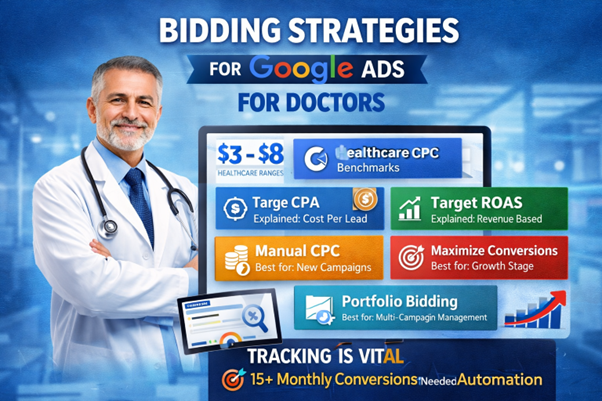
Get it right, and ads scale smoothly. Get it wrong, and budgets disappear fast. In healthcare, bidding should never be aggressive by default. It should be deliberate, calm, and based on real numbers.
Understanding Cost-Per-Click in Healthcare (With Real Benchmarks)
Cost-per-click varies by specialty, location, and competition. Still, most practices fall within a clear range. For many medical specialties in 2026:- Average CPC ranges between $3 and $8
- Highly competitive fields like cosmetic dermatology or dental implants can go higher
- Primary care and urgent care often stay on the lower end
What matters is whether those clicks turn into booked visits.
Target CPA: Paying for Patients, Not Clicks
Target CPA focuses on cost per lead, not traffic. This strategy tells Google:- Find conversions
- Keep the average cost within a set amount
- Conversion tracking is accurate
- The campaign gets 15 or more conversions per month
- Lead quality is consistent
If an average appointment is worth $250 and the practice is comfortable paying $50 per lead, Target CPA can work well. Without enough data, this strategy struggles. Google needs patterns to learn.
Target ROAS vs Target CPA: What’s the Difference?
Target ROAS focuses on revenue.Target CPA focuses on leads. Target ROAS fits better when:
- Appointment values vary widely
- Revenue tracking is reliable
- Services have clear price ranges
- Most leads are similar
- The goal is steady appointment volume
- Revenue tracking is limited
ROAS works better for high-ticket services like cosmetic procedures.
Maximize Conversions vs Manual CPC
Each strategy fits a different stage of growth. Manual CPC- Best for new campaigns
- Gives full control
- Requires frequent monitoring
- Uses automation to find more leads
- Works after data builds up
- Needs solid conversion tracking
Larger practices benefit from automated strategies once data stabilizes.
When Each Strategy Makes Sense
Use Manual CPC when:- Launching new campaigns
- Testing new services
- Budget is limited
- Conversions are consistent
- Tracking is reliable
- Growth is the goal
- There are 15+ monthly conversions
- Cost control matters more than volume
- Lead quality is stable
Portfolio Bidding for Multi-Campaign Practices
Portfolio bidding manages multiple campaigns under one strategy. It works well when:- Running ads for several services
- Managing multiple locations
- Sharing one overall budget goal
This often smooths results and reduces swings. Portfolio bidding suits group practices and clinics with complex structures.
Why Bidding Strategy Makes or Breaks Google Ads for Doctors
Bidding is not about winning auctions.It is about controlling cost while staying visible. The smartest campaigns start simple, gather data, then automate slowly.
Rushing automation too early usually backfires. The real question is not which bidding strategy is best.
It is which one fits the practice today.
Writing Ads That Patients Trust
Medical ads need a different tone. Hard selling feels wrong. Overly clinical language feels cold. Patients respond to clarity and reassurance. Effective ads often include:- Clear service names
- Location references
- Simple benefits
- Calm language
Complete Ad Extensions Guide for Healthcare
Ad extensions are often overlooked but are one of the simplest ways to boost Google Ads performance. They are free, easy to set up, and can dramatically increase click-through rates, often by 10–15%. For doctors, ad extensions also build trust, provide essential information at a glance, and make it easier for patients to take action immediately. Think of them as little signposts that guide a patient from a Google search straight to booking an appointment.Sitelink Extensions: Guide Patients to Key Pages
Sitelinks allow you to add extra links beneath your ad. For healthcare practices, they can point to pages that matter most to patients:- Services – Highlight specialties like “Dermatology,” “Dental Care,” or “Primary Care.”
- Insurance – Show accepted plans and make patients feel secure before calling.
- About Us – Build credibility with doctor credentials, years in practice, and certifications.
- Book Appointment – Send patients directly to scheduling forms or online booking tools.
Call Extensions: Tap-to-Call Convenience
Phone calls remain the strongest conversion signal for healthcare.- Adding a call extension puts the phone number directly in the ad.
- On mobile, patients can tap and call immediately.
- Track these calls as conversions to understand which campaigns drive appointments.
Location Extensions: Make It Easy to Find You
Healthcare is local. Location extensions show your clinic’s address, map pin, and directions. Benefits include:- Increased trust by showing real practice location
- Encouraging nearby searches to call or visit
- Boosting visibility in Google Maps results
Callout Extensions: Highlight What Makes You Different
Callout extensions are short, non-clickable snippets that emphasize key benefits. Examples for healthcare:- “Same-Day Appointments”
- “Board Certified Physicians”
- “Emergency Services Available”
- “Insurance Accepted”
Structured Snippets: Show Services and Insurance Options
Structured snippets let you list multiple offerings or specialties without adding extra words to the headline. For example:- Specialties: Dermatology, Pediatrics, Urgent Care, Dentistry
- Insurance: Blue Cross, United Healthcare, Medicaid, Aetna
Why Ad Extensions Are a Must for Doctors
Ad extensions do more than fill space. They:- Increase click-through rates by 10–15%
- Provide more information upfront
- Make ads look larger and more professional
- Reduce patient friction to contact
Step-by-Step Campaign Setup Guide for Google Ads for Doctors
Starting Google Ads can feel overwhelming. But with a clear process, it becomes simple. A well-structured setup ensures ads reach the right patients, spend stays controlled, and campaigns start producing leads quickly. Here’s a practical, step-by-step guide that any healthcare practice can follow.1. Organize Your Account: Campaigns, Ad Groups, Keywords, and Ads
A clean account structure is critical. Think of it like a filing system:- Campaigns → Usually organized by service or location (e.g., “Dermatology – New York”)
- Ad Groups → Focus on a single service or procedure within the campaign (e.g., “Acne Treatments”)
- Keywords & Ads → Each ad group has tightly related keywords and ads
- Why it matters: Tight organization improves ad relevance, lowers CPC, and makes performance easier to track
2. Create Your First Campaign (Exact Walkthrough)
Here’s a numbered, practical guide:- Sign in to Google Ads and click “New Campaign.”
- Choose Goal: Select Leads for patient appointments.
- Campaign Type: Pick Search to target active patient searches.
- Set Locations: Choose your city or radius around your practice.
- Set Daily Budget: Start with $20–$70/day depending on total monthly budget.
- Select Bidding Strategy: Use Manual CPC initially, then switch to Target CPA once you have enough conversion data.
- Create Ad Groups: One per service (e.g., “Urgent Care Visits,” “Dental Checkups”).
- Add Keywords: High-intent, location-specific keywords per ad group.
- Write Ads: Include the service, location, trust signals, and clear CTA.
- Add Extensions: Sitelinks, call, location, callout, and structured snippets.
- Set Conversion Tracking: Connect via Google Tag Manager for calls, form submissions, and appointment bookings.
3. How to Structure Ad Groups by Service Type
Keep ad groups focused. Examples:- Campaign: Dermatology – Chicago
- Ad Group 1: Acne Treatment
- Ad Group 2: Skin Cancer Screening
- Ad Group 3: Cosmetic Procedures
- Campaign: Dental – New York
- Ad Group 1: Emergency Dentist
- Ad Group 2: Pediatric Dentist
- Ad Group 3: Teeth Whitening
4. Set Up Conversion Tracking
Tracking is critical to know what’s working. Tools to use:- Google Tag Manager: Manages all tags from one place.
- Call Tracking: Google forwarding numbers or dedicated numbers for campaigns.
- Form Submission Tracking: Appointment forms, contact forms, or online booking buttons.
5. Daily Budget Recommendations
Budgets depend on practice size:- Small practices: $500–$2,000/month
- Medium/large practices: $3,000–$10,000/month
- Budget should cover enough clicks to generate 10–15 leads per week.
6. Timeline Expectations
Realistic timing is essential. Google Ads is fast, but results improve with data:- Setup: 2–4 weeks for account creation, ad writing, and conversion setup
- Initial Leads: Often appear within days of ads going live
- Optimization: Takes 60–90 days to stabilize CPCs, conversion rates, and bidding strategies
Landing Pages That Turn Clicks Into Appointments
Landing pages decide whether ad clicks become patients. Sending paid traffic to a homepage often fails because homepages try to please everyone. A good landing page does one thing well. It matches one service with one clear action. When that focus slips, even the best ads stop working.Why Homepages Fail for Google Ads
Homepages carry too many goals. They explain the practice, list services, show blogs, and tell long stories. Patients coming from ads do not want all that. They want reassurance and a next step. If the page feels slow or confusing, they leave. No second chance.Must-Have Elements Checklist
Every high-performing healthcare landing page includes:- A clear, service-specific headline
- A short explanation written in plain language
- One primary call to action
- Fast loading speed
- Mobile-friendly design
Above-the-Fold Requirements (First Screen Matters Most)
The first screen must answer three questions fast:- What service is offered?
- Is this practice trustworthy?
- How can an appointment be booked?
- Phone number
- Call-to-action button
- Service-focused headline
Trust Signals That Reduce Anxiety
Healthcare decisions come with fear. Trust eases it. Strong trust elements include:- Doctor credentials and board certifications
- Years in practice
- Clear specialty focus
- Patient reviews or testimonials
- Clinic photos, not stock images
Mobile Optimization Is Not Optional
More than half of healthcare searches happen on mobile.Often from a car, a couch, or a waiting room. Mobile pages must:
- Load fast
- Use large buttons
- Avoid tiny text
- Keep forms short
Page Speed: The Silent Conversion Killer
Patients are impatient by necessity. Pain does that. Pages should load in under three seconds.Every extra second increases drop-offs. To improve speed:
- Compress images
- Remove heavy scripts
- Use clean design
Multiple CTA Placements Matter
Patients decide at different moments. Place calls to action:- At the top of the page
- Midway after explaining the service
- At the bottom for final reassurance
- “Book an Appointment”
- “Call Now”
- “Request a Visit”
HIPAA Awareness Without Overdoing It
Landing pages should reassure without overwhelming. A short privacy notice works well:- “Your information is kept private and secure”
Less data means less risk.
Insurance Acceptance Should Be Clear
Insurance questions slow decisions. Clearly state:- Major plans accepted
- Self-pay options if available
A/B Testing for Healthcare Landing Pages
Small changes make big differences. Test:- Headlines
- Button text
- Form length
- Trust badge placement
Tracking Results Without Breaking Trust
Results matter. Numbers matter. Doctors run real businesses, not guesswork.At the same time, healthcare demands restraint. Tracking should bring clarity, not cross lines. The goal is simple. Measure what leads to patients. Ignore what risks privacy.
What Should Be Tracked (And What Should Not)
Not every click deserves attention. Not every user action should be logged. Track actions that show intent:- Phone calls
- Appointment requests
- Contact form submissions
- Direction clicks from Google Maps
- Medical conditions
- Symptoms typed into forms
- Diagnoses
- Personal health details
Setting Up Google Tag Manager (Step by Step)
Google Tag Manager keeps tracking clean and organized. It also reduces code errors. A simple setup looks like this:- Create a Google Tag Manager account
- Add the container code to the website header and body
- Connect Google Ads and Google Analytics 4
- Create tags for calls and forms
- Set triggers based on user actions
- Test everything before publishing
Phone Call Tracking That Respects Privacy
Phone calls remain the strongest signal of intent. Two safe options work well: Google forwarding numbers- Free inside Google Ads
- Tracks calls from ads and call extensions
- Counts calls as conversions
- One number per campaign or service
- Forwarded to the main office line
- Tracks call source and duration
A 60-second call usually signals a real patient. A 5-second call often does not. Calls should be counted. Conversations should not be recorded unless legally allowed.
Form Submission Tracking (Appointments and Contact Forms)
Forms show intent when done right. Track:- Appointment request submissions
- Contact form completions
- Form field content
- Medical notes
- Free-text symptom descriptions
- Thank-you page triggers
- Button click events
- Submission confirmations
Google Analytics 4 for Healthcare Use
Google Analytics 4 works well when configured carefully. Key steps:- Connect GA4 through Google Tag Manager
- Enable enhanced measurement
- Set events only for conversions
- Disable unnecessary data collection
Metrics That Actually Matter for Doctors
Vanity metrics confuse more than they help. Focus on these instead:- Cost per lead: How much each patient inquiry costs
- Conversion rate: How many clicks turn into actions
- Click-through rate (CTR): Relevance of ads
- Quality Score: Affects cost and visibility
- Impression share: Missed visibility due to budget or rank
How to Calculate Real ROI
Return on investment is not clicks versus spend.It is patients versus cost. A simple method:
- Estimate average patient lifetime value
- Calculate cost per acquired patient
- Compare the two
When to Adjust or Pause Campaigns
Data should guide decisions, not panic. Pause or adjust when:- Cost per lead rises steadily
- Call quality drops
- Conversion rate falls despite steady traffic
Is this campaign bringing the right patients in the right way?
Common Google Ads Mistakes Doctors Still Make
Mistakes repeat because they feel logical at first. Common issues include:- Targeting too wide
- Letting automated systems run unchecked
- Ignoring negative keywords
- Running ads without landing page optimization
Should Doctors Manage Google Ads or Hire Help?
Some doctors enjoy learning ads. Others prefer focusing on patients. Running Google Ads for doctors takes time. It needs regular review, testing, and adjustment. Hiring help makes sense when:- Time is limited
- Compliance feels overwhelming
- Budgets are meaningful
- Growth is a priority
Google Ads for Doctors vs SEO vs Social Media
Each channel plays a role. Google Ads brings speed. SEO builds long-term visibility. Social media builds awareness. For most practices, Google Ads leads the funnel. It captures immediate demand. SEO supports it over time. Social media reinforces trust. The mistake is choosing only one. The smarter move is sequencing them properly.
Chiropractor PPC: A Complete Guide to Ads, Costs, and Patient Growth
Chiropractor PPC helps clinics show ads to people actively searching for care nearby. It allows practices to appear at the top of search results quickly.
Read More
Step-by-Step Local SEO for Chiropractors: What Actually Works
Imagine you are dealing with neck pain and are in need of immediate help. While searching for a chiropractor, you will certainly want someone closer to home.
Read More
Chiropractor Marketing Ideas That Attract Local Patients
Local growth matters more than wide reach for chiropractic clinics. Most patients search nearby. They want care they can trust. They also want fast answers and clear choices.
Read More
Google Ads for Chiropractors: Targeting Local Searches
Google Ads helps chiropractors reach people who need care right now. Most patients search for help close to home. Local searches drive real appointments, not just website visits.
Read More
SEO for Chiropractors: Complete Guide to Growing Your Practice
Is your chiropractic business struggling to attract new patients? If after being online present your competitors getting more bookings? If that’s the case, you have reached the right place.
Read More
Top 10 Local SEO Strategies for Physiotherapists in 2026
Providing excellent patient care alone is no longer sufficient for physiotherapy clinics. Today, most patients research healthcare providers online before scheduling their first appointment.
Read More


