



Free Funnel Audit
Convert more customers today!
SEO
10 mins read

SEO
10 mins read
Want to know if another website is growing, getting clicks, or losing steam? The fastest way is to use traffic checker tools like Similarweb, Ahrefs, or Semrush. These estimate visits, keywords, traffic sources, and audience behavior.
A few years ago, checking website traffic felt like detective work. Today, it feels more like reading a scoreboard. Brands track competitors daily. Bloggers spy on trending posts. Small business owners compare traffic before buying ads or partnerships. Even food bloggers and local travel sites do it to see which content pulls the biggest crowds.
In today’s digital-first world, all of this makes perfect sense.
Nobody wants to spend months writing content that nobody reads. Nobody wants to pay for a sponsored post on a dead website either. Before making a move, smart site owners check the numbers.
That does not mean every traffic number online is perfect. Far from it. Most tools show estimated traffic, not exact data. Still, those estimates can reveal a lot. A site with rising traffic usually leaves clues everywhere. Better rankings. More backlinks. Higher social shares. More branded searches.
This guide breaks down exactly how to find out how other sites are doing in 2026.
Website traffic tells a story. It shows whether people trust its content or ignore it completely.
In 2026, traffic matters more than ever because search results have changed fast. AI summaries now answer many basic questions. Social platforms push short videos harder. People bounce between apps instead of staying loyal to one platform. So when a website still pulls strong traffic, that means something.
Traffic also helps answer real business questions:
For example, imagine finding a local food blog with huge traffic growth. Then you notice most visits come from “best tacos in Portland” searches. That instantly tells you what readers want.
Traffic data turns guesses into patterns.
A traffic report can reveal much more than visitor numbers.
It can show:
Sometimes one chart explains everything.
A site may get one million monthly visits but almost no engagement. Another may get only fifty thousand visitors. Yet it converts like crazy because the audience trusts the brand.
That is why smart marketers never stare only at total visits.
Yes, but only estimates.
Unless somebody gives direct access to their analytics account, nobody can see exact traffic numbers. Tools collect data from search engines, browser activity, clickstream data, keywords, and public signals to build estimates.
Some tools get surprisingly close. Others miss badly.
Large websites are easier to estimate because they leave bigger data trails. Small local sites are harder. For example, a tiny bakery blog in Oregon may not show much data at all.
Still, traffic tools remain useful because patterns matter more than perfection.
Real traffic data comes directly from analytics platforms like Google Analytics or Matomo. Only the site owner can see those numbers.
Estimated traffic comes from third-party tools. They predict traffic based on:
Think of estimated traffic like weather forecasts. Not exact. But usually close enough to help you plan.
Website traffic means the number of people visiting a website.
Every click, page load, and visit creates traffic data. Analytics tools collect that information and turn it into reports.
Some traffic comes from Google. Some comes from social media. Some comes from people typing the site name directly into their browser.
A healthy site usually gets traffic from several sources instead of depending on one platform only.
Visitors are actual people who land on a website. One person can visit many times. That still counts as one visitor but multiple sessions.
A session starts when somebody enters a site and ends after inactivity. For example, somebody may read five pages in one visit. That counts as one session.
Page views track how many pages people open. If one visitor opens ten pages, that creates ten page views.
Unique users count individual people. Analytics tools try to avoid counting the same person repeatedly.
This is the biggest reason. Brands want to know who dominates search results and why.
Traffic data reveals whether SEO strategies work. Rising organic traffic often means stronger rankings.
Popular pages reveal what audiences care about. A travel blog getting huge traffic from “cheap weekend trips” gives away a valuable content clue.
Big traffic usually means strong brand awareness. People search for brands they know and trust.
Nobody wants to buy ads on a ghost town website. Traffic checks help avoid wasting money.
Usually yes, but results vary.
Big sites leave clear signals online. Smaller sites often hide in the shadows. Some tools may show rich data for one domain and almost nothing for another.
That frustrates many beginners. A site may clearly look active, yet traffic tools show weak estimates. This happens often with local businesses and niche blogs.
So do not panic if the numbers look odd.
Public data includes:
Private data includes:
Only website owners see private analytics.
Traffic tools combine several data sources.
They study search rankings, estimate clicks, and analyze browser behavior. They compare patterns across millions of websites.
Some tools also collect clickstream data from browser plugins and apps. That helps them estimate how people move around the internet.
Sounds creepy? A little. But that is how modern traffic estimation works.
Every tool uses different data models.
One tool may estimate traffic mainly from keywords. Another may rely heavily on browser behavior. That creates gaps.
For example:
That does not mean one tool lies. They simply measure traffic differently.
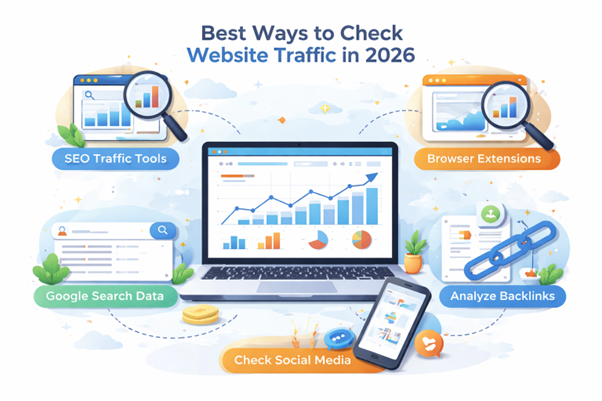
This remains the easiest method.
Enter a domain into tools like Similarweb, Ahrefs, or Semrush. Within seconds, you can see estimated traffic, keywords, and audience trends.
SEO browser extensions reveal quick traffic insights without opening separate dashboards.
Popular options include:
These tools work well for fast research during Google searches.
Google itself gives valuable clues. Search a domain and study:
Sometimes autocomplete alone reveals brand popularity.
Traffic often leaves footprints on social platforms. High shares, comments, and saves usually suggest strong audience interest.
A recipe blog with massive Pinterest saves probably gets healthy traffic too. Food content spreads like wildfire there.
Backlinks often predict traffic growth. When many sites link to a page, Google usually notices. Strong keyword rankings also signal rising visibility.
A page ranking for “best brunch spots in Portland” will likely pull steady visitors every month.
Tool | Free Tier | Paid From | Best For | Accuracy (Large Sites) | Accuracy (Small Sites) |
Similarweb | Yes | Around $199/month | Overall traffic estimates | High | Medium |
Ahrefs | Limited free tools | Around $129/month | Organic traffic and backlinks | High | Medium |
Semrush | Limited free access | Around $140/month | Competitor research | High | Medium |
Google Search Console | Yes | Free | Own website search data | Very High | Very High |
Google Analytics 4 | Yes | Free | Real traffic tracking | Very High | Very High |
Ubersuggest | Yes | Around $29/month | Beginner-friendly SEO tracking | Medium | Low to Medium |
Serpstat | Limited free access | Around $59/month | Keyword trend tracking | Medium to High | Medium |
SE Ranking | Yes | Around $65/month | Budget-friendly SEO monitoring | Medium to High | Medium |
Matomo | Yes | Custom pricing | Privacy-focused analytics | Very High | Very High |
Similarweb gives broad traffic insights fast.
It shows:
Many marketers start here because the dashboard feels easy to understand.
Pros:
Cons:
The free version gives basic insights.
Paid plans unlock deeper keyword and traffic reports.
Ahrefs shines for SEO research.
It estimates organic traffic using keyword rankings and click data.
Ahrefs excels at showing:
SEO professionals love it because backlink data feels incredibly deep.
Pros:
Cons:
Semrush works well for spying on competitors.
It combines SEO, ads, and traffic data into one platform.
Features include:
Pros:
Cons:
Google Search Console provides real Google search data.
It shows:
This tool helps site owners understand how pages perform in Google search.
It is free and extremely valuable.
It only works for websites you own.
No competitor spying here.
Google Analytics 4 tracks actual user behavior.
It reveals:
Pay attention to:
GA4 cannot show competitor traffic.
It only tracks your own site.
Ubersuggest keeps things simple.
Beginners often prefer it because the dashboard feels less intimidating.
It provides:
Pros:
Cons:
Serpstat focuses heavily on keyword trends and SEO analysis.
It helps track ranking movements over time and spot traffic opportunities early.
With competitor analysis, the goal is to spot patterns they already proved successful.
Start by checking which pages attract the most traffic. This reveals:
A site getting huge traffic from “cheap eats in Portland” tells you readers want budget-friendly food guides.
That insight alone can shape months of content planning.
Keyword reports reveal where traffic comes from. Look for:
Sometimes the best opportunities hide in boring-looking keywords nobody talks about.
Backlinks still matter in 2026. Strong backlink growth usually signals rising authority. Ask questions like:
One quality backlink can outperform dozens of weak ones.
Traffic sources explain audience behavior.
Google traffic remains huge for most websites. Strong organic growth usually means effective SEO.
Social traffic shows which platforms matter most. Pinterest still drives tons of recipe and travel traffic. TikTok creates bursts of attention. Reddit can explode overnight.
Referral traffic comes from other websites linking visitors. This often signals strong partnerships or media coverage.
Paid traffic suggests aggressive marketing. If competitors run ads constantly, they likely see strong returns.
Traffic spikes tell stories. Steady growth often means healthy SEO. Sudden drops may signal Google penalties, algorithm updates, or weak content.
Trend data matters more than one isolated number.
Checking a competitor’s traffic sounds technical at first, but it is actually pretty simple once you do it once or twice. The free version of Similarweb gives enough data to understand what is working for competitors.
Go to Similarweb and type the competitor’s website into the search bar.
For example, if somebody wants to study a travel blog or local restaurant guide, they can simply paste the domain name and search.
Try starting with direct competitors first. That makes the comparison more useful. A small local site should not compare itself to giant publishers like Yelp or Tripadvisor because the gap is too large to learn anything practical.
Once the report opens, Similarweb shows estimated monthly traffic near the top of the page.
This gives a quick snapshot of how much attention the website gets. The number is not exact, but it helps identify whether the site is growing, stable, or losing momentum.
A sudden spike in traffic usually means one of three things:
Scroll down to the traffic sources section.
This part matters a lot because it shows where visitors come from. Some websites depend heavily on Google search. Others rely more on Pinterest, YouTube, Facebook, or referrals from other blogs.
The main traffic channels usually include:
This section often reveals the real growth strategy behind a website.
For example, many food blogs get huge traffic from Pinterest. Meanwhile, software companies usually depend more on Google search and branded traffic.
Next, check the top-performing pages.
This section shows which pages attract the most visitors. It is one of the easiest ways to find content ideas that already work.
Pay attention to patterns.
Are list posts performing best?
Do comparison guides get more traffic?
Are seasonal topics driving spikes?
Sometimes one article pulls most of the site’s traffic. That happens more often than people think.
Similarweb also shows where visitors come from geographically.
This helps businesses understand whether competitors attract local, national, or international audiences.
A Portland-based business blog may discover that most competitor traffic comes from the Pacific Northwest. That tells a very different story than a site attracting global readers.
Now repeat the same process for a few competing websites.
Do not study only one site. Patterns become clearer when several competitors show similar trends.
Look for things like:
This is usually where the real insights appear.
Traffic research works best over time.
Take notes or save screenshots each month. Small changes become easier to spot later. A steady rise in traffic often matters more than one temporary spike.
And honestly, this habit helps remove guesswork from content planning. Instead of wondering what people want, the data starts showing clear clues.
Checking personal website traffic can reveal many important and new things about your site.
GA4 tracks user behavior across devices and platforms.
Setup takes only a few steps:
Once active, traffic reports start appearing quickly.
Search Console helps monitor search performance.
It shows:
This tool helps identify pages that need SEO improvements.
Traffic source reports explain how people find your site.
Typical sources include:
Understanding sources helps avoid overdependence on one platform.
Top pages reveal audience interests.
A page pulling strong traffic deserves attention. Update it. Improve it. Expand it.
Sometimes one strong article drives half a site’s visitors.
Traffic means little without engagement.
Watch metrics like:
A site with fewer visitors but higher engagement often performs better overall.
Conversion rate measures actions like:
Traffic without conversions often means wasted effort.
Returning visitors signal audience loyalty.
People rarely return to boring websites.
Traffic tools help, but they are not magic crystal balls. Some estimates come close. Others miss wildly.
Large sites usually produce better estimates because more data exists online.
Third-party tools cannot access private analytics accounts. They estimate traffic using public signals and user behavior data.
That means numbers always contain some guesswork.
For large websites, Similarweb and Semrush often provide strong estimates. Ahrefs performs especially well for organic search analysis.
Still, accuracy varies by industry and traffic source.
Small sites generate limited public data. A local bakery blog or tiny niche forum may barely appear in traffic databases.
That does not mean nobody visits them.
Different tools use different datasets and algorithms. Some focus heavily on keywords. Others prioritize clickstream behavior.
That creates noticeable differences in reports.
AI tools are changing how people discover websites. A few years ago, most traffic came from Google search, social media, or direct visits. Now, platforms like ChatGPT, Perplexity AI, and other AI assistants are sending visitors to websites too.
This matters more than many site owners realize.
Some websites are already getting traffic from AI-generated answers, citations, and recommendation links. In other industries, that number is growing every month. Blogs, news sites, software companies, recipe sites, and review websites are seeing this shift first.
The tricky part is that AI traffic does not always look obvious inside analytics reports. So, many website owners completely miss it.
Google Analytics 4 can help track traffic coming from AI tools.
Start by opening the Traffic Acquisition report inside GA4. Then look at the Session source or Referral source section.
AI traffic may appear under sources like:
Some visits may also appear as direct traffic if referral data gets stripped during redirects. That means AI traffic is sometimes underreported.
Still, checking referral sources regularly can reveal useful patterns.
For example, a blog post may suddenly start getting traffic from ChatGPT referrals after being mentioned in AI-generated answers. That usually signals strong topical authority or helpful content structure.
Similarweb has started adding AI traffic insights into some of its reports. This feature helps estimate how much traffic websites receive from AI-driven platforms and assistants.
The platform studies referral behavior, traffic patterns, and user pathways to estimate AI-generated visits.
This data is still evolving because AI traffic tracking is very new. However, it already helps marketers spot trends early.
For example, if a competitor suddenly gains more AI referral traffic, it may mean their content gets cited often inside AI tools.
That can become a major visibility advantage over time.
This shift is bigger than it looks.
People no longer search the web the same way they did five years ago. Many users now ask AI assistants direct questions instead of scrolling through ten blue links on Google.
That changes how websites earn visibility.
A page that gets featured inside AI answers may attract highly targeted visitors because users already trust the recommendation. In many cases, those visitors spend longer on the site because they arrive with a clear purpose.
This also changes SEO strategy.
Now the goal is not only ranking on Google. The goal is creating content clear enough, trustworthy enough, and useful enough for AI systems to reference confidently.
And honestly, this trend is still just getting started.
Free tools still provide useful insights.
They can help:
For beginners, free versions often work well enough.
Free tools usually restrict:
Some reports also hide deeper competitor insights.
Paid tools make sense when traffic research affects money or business growth. Agencies, SEO professionals, and serious publishers often need deeper data.
A good tool can save hundreds of hours.
Rising rankings often signal healthy SEO momentum. More keywords usually mean broader visibility.
Growing backlink profiles often suggest rising authority. Strong content naturally attracts links.
When people search for a brand name directly, awareness is growing. That is a strong trust signal.
Pages with longer session times and better interaction often indicate stronger audience connection. People stay when content solves problems well.
Growing referral and social traffic often signals rising brand visibility across the web.
Traffic data means nothing without action. The goal is not collecting charts, but making smarter moves.
Look for topics competitors missed. Those gaps often create the easiest SEO wins.
Competitor keyword reports reveal traffic opportunities quickly. Focus on keywords with clear intent and manageable competition.
Low-performing pages deserve attention. Sometimes simple updates revive traffic surprisingly fast.
Traffic research helps shape stronger SEO plans. It reveals what audiences actually search for instead of what marketers assume.
Competitor tracking should become a habit. Websites change fast. Search trends shift constantly. Yesterday’s traffic winner can disappear overnight.
Yes. Free tools like Similarweb, Ubersuggest, and Google Search Console can show basic traffic data. They usually provide estimated visits, top keywords, and traffic sources. Free versions work well for beginners and casual research. Still, advanced reports and deeper insights often require paid plans for full access.
Mostly yes, but only estimated data. Public tools cannot access private analytics accounts unless the site owner shares them. Large websites usually show better estimates because they generate more online signals. Smaller websites may show limited or inaccurate data because traffic tools collect less information about them.
The best tool depends on the goal. Similarweb works well for overall traffic estimates. Ahrefs excels at SEO and backlinks. Semrush helps with competitor research. Google Analytics works best for tracking personal websites. Beginners often prefer Ubersuggest because it feels simple and less overwhelming than advanced SEO platforms.
Similarweb is usually fairly accurate for medium and large websites. It estimates traffic using clickstream data, search trends, and user behavior. Smaller websites can show weaker estimates because less data exists. The tool works best for spotting trends and comparing competitors rather than finding exact visitor numbers.
No. Google Analytics only tracks websites connected to the user’s account. It cannot reveal competitor traffic data. To estimate competitor visits, tools like Similarweb, Ahrefs, or Semrush work better. Google Analytics focuses on real user behavior, engagement, and conversions for owned websites instead of outside domains.
Traffic tools show traffic sources inside analytics reports. Common traffic channels include organic search, social media, direct visits, referrals, and paid ads. Platforms like Google Analytics and Similarweb break traffic into categories. This helps explain how visitors discover a website and which marketing channels perform best over time.
Good traffic depends on the website type and goals. A local business may succeed with a few thousand monthly visitors. Large media sites often need millions. Quality matters more than raw numbers. A smaller audience that buys products, reads pages, or joins email lists can outperform huge low-quality traffic.
Ubersuggest works well for beginners because the dashboard feels easy to understand. Similarweb also offers simple traffic insights without too much complexity. New website owners often start with Google Analytics and Search Console because both tools are free and provide reliable data directly from Google’s ecosystem and search platform.
Traffic tools use different algorithms and data sources. Some rely more on keyword rankings while others use browser behavior or clickstream data. That creates different estimates for the same website. The numbers rarely match exactly. Comparing several tools usually provides a clearer and more balanced picture overall.
Most website owners check traffic weekly or monthly. Daily checks can become distracting because traffic naturally fluctuates. Businesses running ads or active SEO campaigns may monitor traffic more often. Regular tracking helps spot trends, traffic drops, and growth opportunities before they become bigger problems or missed chances.
Start using our A/B test platform now and unlock the hidden potential of your website traffic. Your success begins with giving users the personalized experiences they want.
Start Your Free Trial

Empowering businesses to optimize their conversion funnels with AI-driven insights and automation. Turn traffic into sales with our advanced attribution platform.
Trusted by Customers


©CausalFunnel Inc. All rights reserved.