



Free Funnel Audit
Convert more customers today!
SEO
10 mins read

SEO
10 mins read
If you run an ecommerce store, you already know this feeling. A customer adds products to their cart. They seem interested. They move to the checkout. And then… they leave.
No purchase. No explanation.
This is called cart abandonment. While common, there are a few strategies to resolve it.
With the right cart abandonment solutions, you can recover a large part of those lost sales. In this guide, we will walk through everything in a simple and practical way. No jargon. No fluff. Just clear steps that work.
Cart abandonment happens when a customer adds items to their online shopping cart but leaves the website without completing the purchase.
Let’s look at a simple example.
You visit an online store. You like a pair of shoes. You add them to your cart. You go to checkout. Then you see extra shipping charges. Or maybe the process feels too long. So you close the tab.
That is cart abandonment.
This is not a small issue. It directly impacts your revenue.
Think about it this way. These users were already interested. They were close to buying. Losing them at the last step means losing easy sales.
That is why focusing on cart abandonment solutions can give you quick wins without spending more on ads or traffic.
Cart abandonment rate tells you how many people added items to their cart but did not complete the purchase.
It helps you understand how much revenue you are losing during checkout.
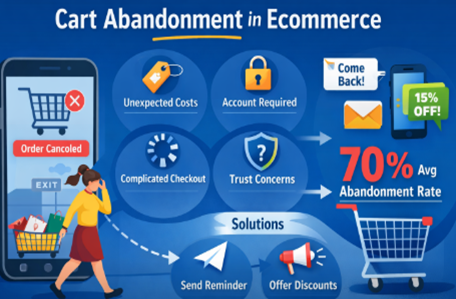
Across industries, the average cart abandonment rate is around 70%. That means 7 out of 10 shoppers leave without buying.
This number can feel high. But it also shows the opportunity. Even a small improvement can bring in more sales.
Your rate depends on many factors:
For example, high-ticket items often have higher abandonment. People take more time to decide.
Here is the simple formula:
CAR = (1 − Completed Purchases / Total Carts) × 100
Let’s say:
Your cart abandonment rate would be:
(1 − 30/100) × 100 = 70%
A “good” rate depends on your industry. But here is a simple way to think about it:
Cart Abandonment Rate | Meaning |
60% or lower | Very good |
60%–75% | Average |
75%+ | Needs improvement |
Some industries like travel and luxury products may naturally have higher rates. So instead of chasing a perfect number, focus on improving your own baseline.
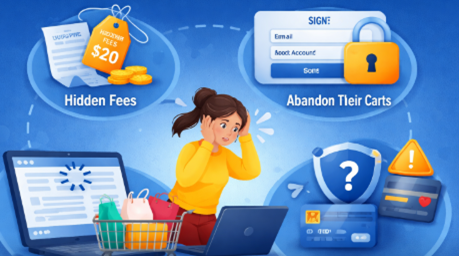
Most users do not leave randomly. They leave for clear reasons.When you know these reasons, fixing them becomes much easier.
Let’s go through the most common ones.
This is one of the biggest reasons.
A user sees a product for $280. At checkout, it becomes $400 due to shipping, taxes, or extra fees.
That sudden jump feels like a bad surprise. So instead of continuing, the user leaves.
Many users do not buy on the first visit.
They open multiple tabs. They compare prices across websites.
Even if they like your product, they may leave to check:
This does not always mean lost interest. Sometimes, it just means delayed decisions.
Some users just want a quick checkout. If you force them to create an account, it feels like extra work.
So instead of continuing, they drop off. A simple guest checkout option can reduce this friction.
Too many steps can frustrate users. Too many form fields can slow them down.
For example:
Users lose patience. And once they do, they leave.
Not everyone pays the same way. Some prefer cards. Others prefer wallets or UPI.
If users do not see their preferred option, they may not continue. In fact, limited payment options account for around 13% of cart abandonment.
That is a significant number.
Sometimes users want to pay, but the payment fails. This can happen due to:
If your site shows a vague error, users get confused.
About 9% of abandonment happens due to payment failures. Clear error messages and alternative payment options can help here.
Speed matters more than you think. If your site:
Users will not wait. They will simply leave and may not come back.
Users are careful with their money. If your site does not look secure, they hesitate.
This can happen when:
Even small doubts can stop a purchase.
Users want to feel safe after buying. If your return policy is unclear or too strict, they hesitate.
Common concerns include:
If they do not find clear answers, they leave.
Sometimes it is not one thing. It is the overall feeling.
If your site:
Users may not trust it enough to complete the purchase.
These cart abandonment solutions are grouped so you can take action easily. Start with checkout fixes, then move to recovery strategies.
Keep it short and clean. Reduce the number of steps. Remove fields that are not necessary.
For example, do you really need a company name or second phone number? Fewer steps mean fewer chances to drop off.
Allow users to check out as guests. You can always ask them to create an account after the purchase.
This small change can improve conversions, especially for first-time buyers.
Be clear from the start. Show shipping, taxes, and extra charges early in the process.
This builds trust and avoids surprises.
Show users how close they are to finishing. A simple progress bar like “Step 2 of 3” works well.
It gives users a sense of control and encourages them to complete the process.
Different users prefer different payment methods.
Include:
The more options you offer, the easier it is for users to pay.
Users need to feel safe.
Add:
Also, keep your design clean and professional. Trust plays a huge role in conversions.
Many users shop on mobile. Your checkout should be:
Use large buttons and simple forms. Avoid forcing users to zoom or scroll too much.
Even after users leave, you can still bring them back. This is where recovery strategies help.
This is one of the most effective cart abandonment solutions. And when done right, it can recover a large part of lost sales.
The key is timing and structure. You should not send just one email. Instead, use a short sequence that feels helpful, not pushy.
Let’s break it down in a simple way.
When to Send | Goal | |
Email 1 | Within 1 hour (or up to 6–12 hours for high-value carts) | Reminder |
Email 2 | After 24 hours | Build trust |
Email 3 | After 72 hours | Push with incentive |
Now let’s look at what each email should include.
This is the most important email. Right after abandonment, the user still remembers your product. Their intent is still strong.
Send this within 1 hour. However, for expensive products, you can wait 6–12 hours. This gives users time to think.
What to include:
Example tone:
“Hey, you left something in your cart. Want to finish your order?”
Keep it light. No pressure.
At this point, the user may have doubts. So instead of pushing, focus on reassurance.
What to include:
This is where social proof works well.
You can say things like:
This helps users feel more confident.
Now you can add urgency. If the user has not converted yet, a small incentive can help.
What to include:
Examples:
Keep it clear and direct.
Your email will not work if it is not opened. So subject lines matter a lot.
Keep them:
Examples:
Avoid spammy words. Keep it natural.
These are general benchmarks. Your numbers may vary.
If your numbers are lower, test your timing, subject lines, and content.
SMS has high open rates. Send short reminders like:
“Hey, you left something in your cart. Grab it before it’s gone.”
Keep it clear and not too frequent.
Show a popup when users are about to leave.
You can:
This can stop them before they exit.
Not every visitor buys on the first visit. And that is completely normal.
Retargeting helps you bring those users back.
It works by showing ads to people who visited your site but did not complete the purchase. When they see the same product again, it reminds them to come back and finish what they started.
A user visits your store. They view a product. They leave.
Later, they see an ad for that exact product on another platform.
That is retargeting. It keeps your product fresh in their mind.
Here are the most effective options:
These are very powerful. They automatically show users the exact products they viewed or added to cart.
Why they work:
You do not need to create separate ads for each product. The system pulls data from your catalog.
These ads appear on:
They show product images, prices, and store details.
Best for:
Not all abandoned carts are the same. So your ads should not be the same either.
Segment users based on behavior.
Simple segmentation ideas:
Segment | Strategy |
Low cart value | Gentle reminder ads |
High cart value | Add urgency or small incentive |
Viewed but not added to cart | Show product benefits |
Added to cart but didn’t buy | Show urgency + trust signals |
This makes your ads more relevant. More relevant ads perform better.
Things are changing in digital marketing.
Third-party cookies are being phased out. That means tracking users across websites is becoming harder.
So now, brands rely more on first-party data.
What is first-party data?
It is data you collect directly from your users:
You can use this data to:
This makes your retargeting more accurate and more reliable.
People act faster when they feel urgency.
Use:
Also add:
This builds confidence and encourages action.
Now let’s combine everything. Use multiple channels together:
This increases your chances of recovery.
Set up automated workflows.
For example:
This runs in the background and keeps working for you.
Do not just set it and forget it. Track how many users come back and complete purchases.
This helps you improve your strategy over time.
At some point, manual efforts are not enough. You can send a few emails. You can try reminders. But as your store grows, things get messy.
That is where cart abandonment tools help.
These tools automate your recovery process. They send emails, trigger SMS, and even run retargeting campaigns. All without you doing things manually every day.
If you are serious about improving your cart abandonment solutions, using the right tool can save time and increase revenue.
Let’s keep this simple and practical.
Before we jump into tools, here are a few things to check:
Tool Name | Best For | Pricing | Platform Support | Key Features |
Omnisend | All-in-one marketing automation | Free + Paid plans | Shopify, WooCommerce, BigCommerce | Email, SMS, automation, pre-built workflows |
Klaviyo | Advanced email + segmentation | Free (limited) + Paid | Shopify, WooCommerce | Deep segmentation, powerful automation, analytics |
CartStack | Dedicated cart recovery | Paid | Shopify, WooCommerce, Magento | Email recovery, managed services, exit popups |
Shopify (Built-in) | Shopify users | Free (basic) | Shopify only | Native abandoned cart emails, easy setup |
WooCommerce Plugins | WooCommerce users | Free + Paid plugins | WooCommerce | Email reminders, coupons, customization |
If you want something simple but powerful, Omnisend is a good place to start.
It offers:
The free plan is helpful for small stores. As you grow, you can move to paid plans.
Klaviyo is more advanced. It is great if you want detailed targeting and personalization.
For example:
It takes a bit more time to learn. But it gives you more control.
CartStack is focused only on cart recovery.
It helps you:
This is useful if you want a dedicated solution without handling everything yourself.
If you use Shopify, you already have basic tools.
You can:
It is simple. It works well. But it has limited features compared to advanced tools.
WooCommerce does not have one built-in system. Instead, you can choose from many plugins.
Popular features include:
This gives flexibility. But it also means you need to choose the right plugin carefully.
Here is a simple way to decide:
Go for free tools if:
Go for paid tools if:
Not all ecommerce platforms work the same way.
So while the core ideas stay the same, how you apply cart abandonment solutions depends on your platform.
The good news is this. Most major platforms already offer built-in tools or easy integrations.
Let’s go through the three most common ones.
If you use Shopify, you already have a basic cart recovery system. You do not need extra tools to get started.
What Shopify offers:
How it works (simple flow):
Timing setup:
You can choose when the email is sent. For example:
Best practice:
Start with 1–6 hours. This is when intent is still high.
WooCommerce is different. It does not have a strong built-in recovery system. Instead, you use plugins. This gives you more flexibility. But you need to choose the right setup.
What you can do with plugins:
Popular plugin features:
Things to keep in mind:
BigCommerce sits between Shopify and WooCommerce. It has more built-in features than WooCommerce. But it is not as simple as Shopify.
What BigCommerce offers:
What makes it useful:
Platform | Built-in Recovery | Ease of Use | Customization | Best For |
Shopify | Yes | Very easy | Moderate | Beginners and fast setup |
WooCommerce | No (plugin-based) | Medium | High | Flexible, custom setups |
BigCommerce | Yes | Easy | Good | Scaling businesses |
Test small changes like:
See what works better.
Use tools to see where users leave. Is it the payment page? Shipping page?
Fix those areas first.
Do not rely on guesses. Look at the data. Make changes. Test again.
This is how you build a strong system.
Use this quick checklist:
Cart abandonment is common. Almost every ecommerce store deals with it.
But the important thing is this. It is fixable. You do not need a complete redesign. Small changes can make a big difference.
Start by improving your checkout experience. Then add recovery systems like email and SMS. Over time, keep testing and improving.
When you focus on user experience and follow proven cart abandonment solutions, you turn lost opportunities into real revenue.
Local SEO for restaurants is the process of improving your online presence so your restaurant appears in local Google searches. It helps your business show up in Google Maps and “near me” results.
When someone searches for food nearby, local SEO decides whether they find you or a competitor. It directly connects searchers with nearby restaurants ready to visit.
Local SEO is important because most customers search online before choosing where to eat. If your restaurant is not visible, you lose potential customers instantly.
It helps you:
Without local SEO, even good restaurants stay hidden online.
Google ranks restaurants based on three main signals:
Prominence comes from reviews, backlinks, and activity. Stronger signals increase your chance of appearing in the top 3 Map Pack.
To rank higher in Google Maps, focus on activity and trust signals.
Key actions include:
Active profiles get better Map Pack visibility.
The Google Map Pack is the top 3 local business results shown on Google. It appears above organic search results.
Being in the Map Pack leads to:
Most users click one of these top 3 listings.
Yes, new restaurants can compete in local SEO if they optimize correctly. Google does not require years of history to rank locally.
To compete faster, you require:
Consistency helps new restaurants gain visibility quickly.
Start using our A/B test platform now and unlock the hidden potential of your website traffic. Your success begins with giving users the personalized experiences they want.
Start Your Free Trial

Empowering businesses to optimize their conversion funnels with AI-driven insights and automation. Turn traffic into sales with our advanced attribution platform.
Trusted by Customers


©CausalFunnel Inc. All rights reserved.